Documentation & Quickstart · v0.1
Up and running in one binary.
Daypress keeps its state in the directory it runs from: SQLite in
data/neopress.sqlite, media in uploads/, backup snapshots in backups/, and imported theme files in static/themes/.
Plate IV
Compiler
1. Install and run
Three ways to start the server
By default Daypress listens on port
8090 and stores its SQLite database in data/neopress.sqlite. Override them anytime with --port / PORT and --db / DATABASE_PATH.Prebuilt binary
Download the archive for your platform and
SHA256SUMS from GitHub Releases. Verify the checksum and start the binary (on macOS, clear quarantine first with xattr -d com.apple.quarantine neopress):sha256sum --check --ignore-missing SHA256SUMS tar -xzf neopress-<version>-x86_64-unknown-linux-gnu.tar.gz ./neopress-<version>-x86_64-unknown-linux-gnu/neopress
Docker Compose
There is no published Docker Hub image yet, so Compose builds it from source in a few minutes. The database, uploads, and backups live in the
neopress_neopress-data volume:git clone https://github.com/Trooper-lab/daypress.git cd neopress docker compose up -d --build docker compose logs neopress
From source with Cargo
Compile and run the release binary directly with Cargo. Once started, visit
:8090/ for the public site, :8090/n-admin/ for admin, and :8090/n-admin/builder for Daystudio:git clone https://github.com/Trooper-lab/daypress.git cd neopress cargo run --release -p neopress-server --bin neopress
2. First login & password reset
No default passwords
On first start Daypress creates an
admin account and prints a generated password once to stderr (or uses NEOPRESS_ADMIN_PASSWORD if set). Log in at /login and change it under Users → Profile. Repeated failed logins are throttled (5 attempts per 15 minutes).Lost the password? Use Lost your password? on the login page to email a 1-hour single-use link, or reset it directly on the server:
$
neopress reset-password admin --db data/neopress.sqlite --sign-out-everyone3. Transactional Email (SMTP)
Environment configuration
Form notifications and password resets are sent over SMTP. Set these environment variables, restart, and click Settings → General → Send test email:
| Variable | Meaning |
|---|---|
| NEOPRESS_SMTP_HOST | SMTP server hostname (required to send; otherwise logs not_sent) |
| NEOPRESS_SMTP_PORT | Port (default 587; 465 for tls, 25 for none) |
| NEOPRESS_SMTP_SECURITY | starttls (default), tls, or none |
| NEOPRESS_SMTP_USER / _PASSWORD | SMTP credentials if required by your server |
| NEOPRESS_SMTP_FROM / _FROM_NAME | Sender address & name (defaults to admin email and site title) |
4. WordPress Migration & AI Assistant (MCP)
Bring your site, connect your AI
Import an existing WordPress site in four steps, or connect Claude Desktop, Claude Code, and Cursor directly to Daypress via the Model Context Protocol.
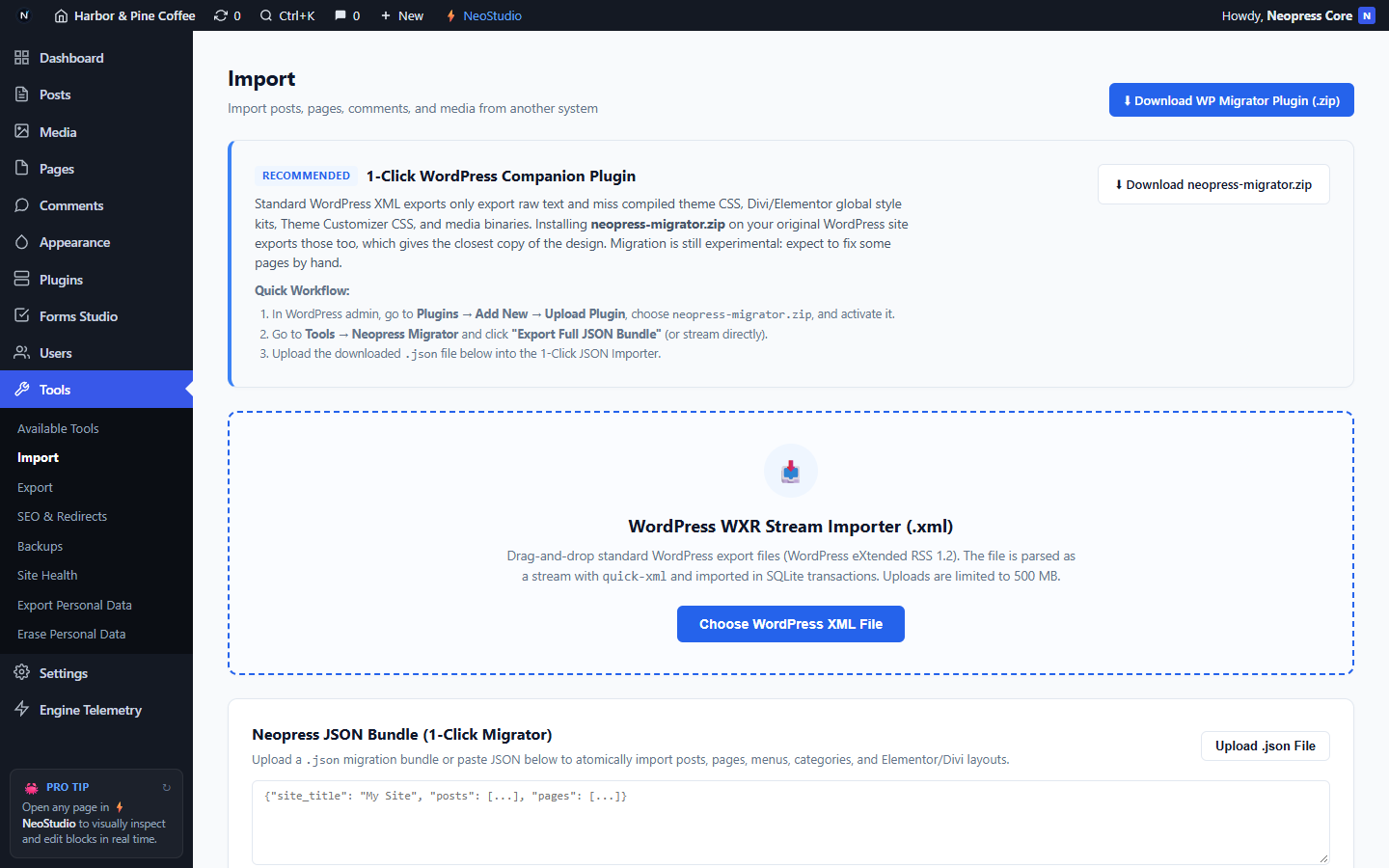
Migrating a WordPress site
- In Daypress, go to Tools → Import and download
neopress-migrator.zip. - In WordPress, go to Plugins → Add New → Upload Plugin, upload the zip, and activate it.
- In WordPress, open Tools → Daypress Migrator and click Export Full JSON Bundle.
- Back in Daypress, upload the
.jsonfile under Tools → Import (or upload a standard WordPress WXR.xmlexport up to 500 MB).
Connecting an AI assistant (MCP)
Run Daypress in stdio mode (
--mcp-stdio) or call POST /mcp over HTTP using an administrator Application Password created under Users → Profile:curl -X POST https://daypress.dev/mcp \
-u "admin:<application-password>" \
-H "Content-Type: application/json" \
-d '{"jsonrpc":"2.0","id":1,"method":"tools/list","params":{}}'| MCP Tool | What it does |
|---|---|
| neopress_list_posts / _get_post | List or fetch posts and pages by ID, slug, status, or keyword |
| neopress_create_post / _update_post | Create or update posts, pages, excerpts, status, and SEO fields |
| neopress_get_post_layout / _update_post_layout | Read or validate & persist a page's Daystudio AST layout JSON |
| neopress_get_settings / _update_option | Inspect or update site options, titles, theme CSS, and front page |
| neopress_import_wp_bundle | Atomically import a full WordPress JSON migration bundle |